How-to · Zero Trust edge
Lock pre-prod hosts to your VPN with one field
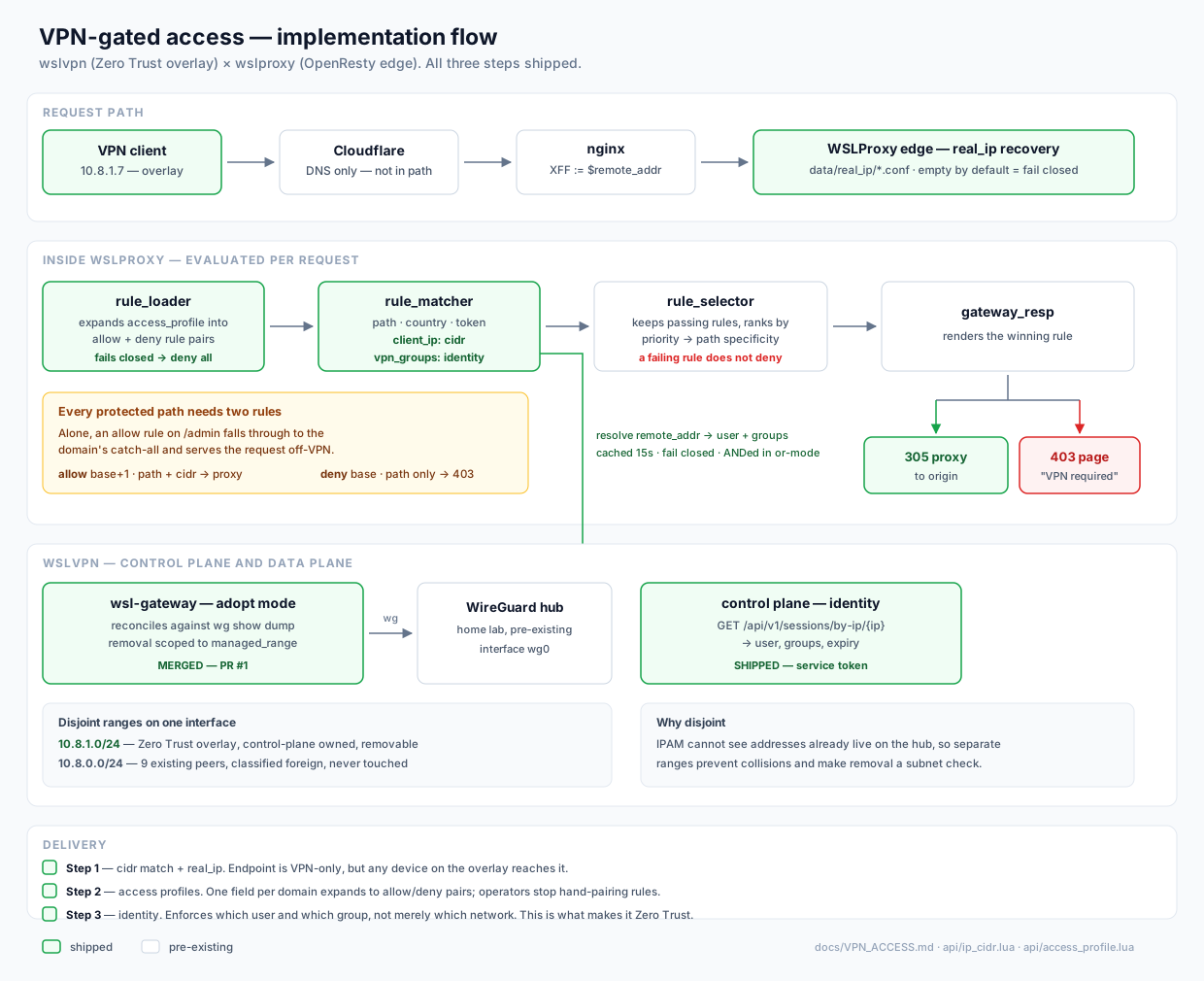
Keep int. and test. hostnames on public DNS, but answer only to clients that come in through your VPN or office network. Everyone else gets a branded 403 "VPN required" page. You don't need to reload nginx or set up private DNS.
Why not just allow/deny in nginx?
Static allow/deny blocks need a reload for every change, and they live outside the control plane that already routes the host.
Hand-written WSLProxy rules can do it, but a VPN rule only works in a pair. The selector drops any rule whose IP check fails, so a lone "allow from VPN" rule
lets off-VPN traffic fall through to the catch-all, and that traffic gets proxied anyway. One forgotten deny rule leaves a hole that nobody notices.
An access profile is a named bundle of protected endpoints. Each endpoint expands into the correct allow/deny pair when the config loads, so the pairing is never left to memory.
1. Get the real client IP right first
cidr matching checks remote_addr. If Cloudflare or another proxy sits in front, configure data/real_ip/ before anything else. Then check:
curl -sI https://int.example.com/ | grep -i x-origin-ipIt must show your public or VPN exit address, not the front proxy's.
2. Define the profile
Create data/access_profiles/prod/example-preprod.json on every edge that serves the host:
{
  "name": "example-preprod",
  "allow_cidrs": "203.0.113.10/32, 10.8.1.0/24",
  "origin": "http://10.0.0.20:8080",
  "endpoints": [
    { "path": "/", "path_key": "starts_with" }
  ]
}namemust match the filename.allow_cidrstakes a comma-separated list of IPv4 ranges. A bare address counts as/32.originis where allowed traffic is proxied. Set it explicitly. Without it, traffic falls back to the server'sproxy_pass.- Optional: per-endpoint
allow_cidrs, wslvpngroups,deny_code, and a custom base64deny_message.
3. Attach it to the host
Add one field to data/servers/prod/host:int.example.com.json:
"access_profile": "example-preprod"
The rules take effect on the next request, without a reload. Generated rules start at priority 1000, so they outrank the host's own catch-all. Within a profile, a narrower path outranks a broader one, so you can protect /admin/billing more tightly than /admin.
access_profile failed, denying all requests for <host>.
4. Verify from both sides
# Off the VPN — expect 403 and the "VPN required" page
curl -so /dev/null -w '%{http_code}\n' https://int.example.com/

# Either side — see the verdict
curl -sI https://int.example.com/ | grep -iE '^x-(wsl-vpn|origin-ip)'
# X-WSL-VPN: blocked
# X-WSL-VPN-Profile: example-preprod
# X-WSL-VPN-Reason: client-ip-not-allowed
Check both sides. If the allow rule works but the deny rule is broken, it looks exactly like a working setup from inside the VPN.
ACME challenges stay reachable without the VPN, because /.well-known/acme-challenge/ has its own nginx location that never runs the rule gateway. Certificates keep renewing.
The "VPN required" page
Denied visitors see a self-contained page with light and dark styling, a reload button, and a link back to wslproxy.org, so anyone who lands on it can see what is protecting the host.
Set deny_message on a profile to replace it with your own HTML.
Going further: per-user access
A CIDR check answers "did this request come in over the VPN?". To answer "who sent it?", set WSL_CONTROL_URL, then add groups to a profile or endpoint.
WSLProxy resolves the client address against the wslvpn control plane and matches group membership. That is the Zero Trust step up from a network allow-list.
Read more
- docs/VPN_ACCESS.md: full field reference, generated priorities, identity setup
- github.com/bwalia/wslproxy: source, Docker quick start, Ansible POP deploys